Whether you are completing a home renovation, setting up a new office network, or organizing loose wires in a workshop, PVC cable trunking is one of the most affordable, practical solutions for hiding and protecting electrical or data cables. Unlike metal trunking, PVC is lightweight, resistant to moisture and corrosion, and easy to cut and shape without specialized tools, making it ideal for DIY beginners and professional electricians alike. This PVC cable Trunking tutorial will walk you through every key step of planning, preparing, and installing PVC cable trunking, helping you achieve a clean, safe, and professional-looking result without unnecessary hassle. Before you start any installation, proper planning and preparation are the foundations of a successful project, and this step is often overlooked by new DIYers. First, you need to map out the route of your cables and measure the total length of trunking you will need. Walk along the intended path, note any corners, turns, or obstacles like door frames or wall fixtures, and add 10% extra length to your total measurement to account for cutting mistakes or future adjustments. Next, gather all the necessary tools and materials before you begin: you will need PVC cable trunking in the correct size (choose a size that leaves 20-30% extra space inside for adding more cables later), matching connectors, elbows, end caps and mounting clips, a tape measure, a pencil for marking, a fine-tooth hacksaw or PVC cutting tool, sandpaper, a level, a drill with appropriate bits, screws or adhesive, and a screwdriver. It is also important to turn off all power to any electrical cables you will be working with to avoid safety hazards, and check the wall for hidden pipes or wires using a detector before drilling any holes. Once your planning and preparation are complete, you can move on to cutting and fitting the trunking components to match your planned route. Start by cutting the main trunking sections one at a time, securing the trunking in a clamp or vise to keep it steady while cutting. A fine-tooth hacksaw will give you a clean, straight cut, but specialized PVC cutters can make the job faster and reduce the risk of jagged edges. After cutting each piece, use fine-grit sandpaper to smooth the cut edges, this removes any burrs that could damage cable insulation or prevent components from fitting together properly. When you reach a corner or turn, use pre-molded PVC elbow connectors to create a neat 90-degree turn instead of cutting the trunking at an angle, pre-molded connectors maintain a consistent internal space for cables and create a much cleaner finished look. For straight connections between two trunking sections, simply use matching straight couplers to join the pieces securely. After cutting and dry-fitting all components to confirm they fit your route correctly, you can move on to mounting the trunking to your surface. First, hold the first trunking section against the wall or ceiling along your marked line, use a level to check that it is straight, and mark the positions for your mounting clips or screw holes. Most PVC trunking is designed to be mounted with clips every 30 to 40 centimeters along the length, this prevents the trunking from sagging over time, especially when it is full of cables. If you are working on a solid wall like brick or concrete, drill pilot holes and insert wall plugs before driving in the screws, if you are mounting to drywall or wood, you can screw directly into the surface after marking. For temporary installations or installations on delicate surfaces like tiled walls that you do not want to drill, strong double-sided adhesive tape made for heavy-duty use can be a good alternative, just make sure the surface is clean and dry before applying the adhesive. Once all the base trunking sections are mounted securely, you can pull all your cables through the trunking before attaching the lid. It is a good idea to organize your cables as you pull them through, separating power cables from data cables if possible to reduce interference, and leave a little extra slack at each end for future adjustments. Pulling cables through before closing the trunking makes it much easier to adjust or add cables later if you need to. Once all cables are in place, simply snap the PVC lid onto the base of the trunking, most PVC trunking systems have a snap-fit design that does not require extra screws or adhesive, making it easy to open the trunking again later if you need to add or remove cables. Finish the installation by capping off any open ends with matching PVC end caps to create a clean, finished look, and check all connections to make sure everything is secure. After completing the installation, take a few minutes to do a final check: confirm that the trunking is straight and secure, all cables are properly contained, and all connections and caps are fitted correctly. If you notice any small gaps between components, you can use a tiny amount of white silicone caulk to fill the gap for a neater look, especially if the trunking is installed on a visible wall. One of the biggest advantages of PVC cable trunking is that it requires almost no long-term maintenance, simply wipe it down with a damp cloth occasionally to remove dust, and you can easily open the lid to add new cables or rearrange existing ones at any time. By following the steps in this tutorial, even a beginner can complete a professional-quality PVC cable trunking installation that will keep your cables organized, protected, and hidden for many years. The key to success is taking your time during the planning and preparation stage, measuring twice before cutting, and ensuring all components are fitted securely before adding your cables. With its low cost, ease of installation, and long lifespan, PVC cable trunking remains the top choice for most cable organization projects, and this guide gives you all the information you need to get the job done right.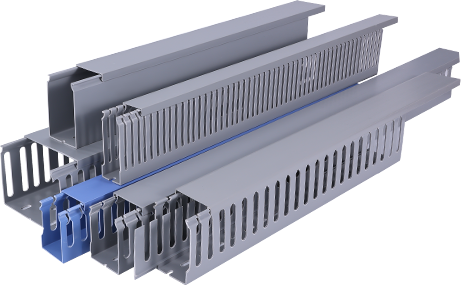
A Beginner’s PVC Cable Trunking Tutorial: Step-by-Step Installation Guide
by
Tags: